Computer Support System

  • Subscribe to our RSS feed.
  • Twitter
  • StumbleUpon
  • Reddit
  • Facebook
  • Digg

Friday, 17 September 2010

USB Device not Recognized in Windows

Posted on 19:57 by Unknown

Search:

USB Device not recognized, Error USB Device, USB Device, Trouble USB Device, Syntac Error USB Device

Are you getting a “USB device not recognized” error whenever you plug in a USB mouse, keyboard, or other USB device? I love USB and have 5 ports on my computer so that I can connect my mouse, keyboard, camera, phone, and printer to it all at once!

However, last weekend, my computer stopped recognizing my USB devices! The strange thing about it was that the USB ports were not bad because all of my devices were still getting power to them. I could still charge my cell phone without a problem!
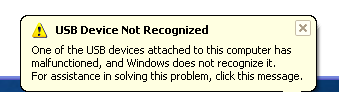
usb device not recognized

So I started with the normal fixing methods, including uninstalling the drivers for my devices and reinstalling them. That didn’t work! Next I tried System Restore thinking that maybe I had installed something and it caused a conflict with the USB system drivers. That didn’t work!

I read online that in order to fix this problem I should go to Device Manager and uninstall all of the devices under USB Controllers. Restarted the computer, reinstalled the USB drivers, but the problem STILL did not go away!

You may also see in Device Manager that the device shows up as an “Unknown Device”.
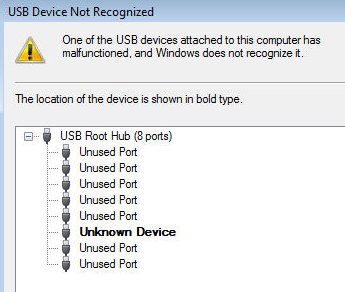
unknown usb device

So how did I finally fix the problem? Well, apparently it’s a super simple solution! No need to edit the registry, uninstall drivers, or anything of that sort.

Simply UNPLUG YOUR COMPUTER FROM THE POWER SUPPLY. Yes that’s it! Note that this does not mean just turning off your computer because modern computers don’t really turn off when you press the power button as the motherboard still gets power.

First to explain, the motherboard is where all of hardware of the computer is connected to, including the USB ports. Sometimes the motherboard needs to be “rebooted” also because something can go wrong, i.e. all your USB ports suddenly stop working. The small microprocessor on the motherboard will reload the drivers and your USB ports should be back to recognizing all devices!

So first turn off your computer using Shut Down or pressing the power button and then UNPLUG it from the wall outlet. Let it sit for about a minute and then plug it back in.

Hope this helps someone fix that pesky “USB device not recognized” Windows error!


Search:

USB Device not recognized, Error USB Device, USB Device, Trouble USB Device, Syntac Error USB Device

Email ThisBlogThis!Share to XShare to FacebookShare to Pinterest
Posted in Blog, Computer Troubleshooting, Error Computer, File Sharing, Free Articles, My Computer, Operating System, Troubleshooting all | No comments
Newer Post Older Post Home

0 comments:

Post a Comment

Subscribe to: Post Comments (Atom)

Popular Posts

  • Clearing Hard Drive Space on Windows XP
    Windows XP was released way back in 2001, so what should you do when you’re running out of hard drive space for these 2009 programs? Clearin...
  • What to Look For When Purchasing a Mouse
    The mouse is probably the most essential part of many users experience with computers. Your mouse can affect the ease of browsing around the...
  • How To: Install Windows Mobile 6.5 Right Now
    The bad news:  Windows Mobile 6.5  won't be coming out for a while, and you'll be expected to buy a whole new phone to get it. The g...
  • Windows Explorer Keyboard Shortcut
    Windows Explorer keyboard shortcuts Press To END Display the bottom of the active window. HOME Display the top of the active window. NUM LOC...
  • Automate Windows Maintenance Tasks to Keep Your PC Running Like New
    With a Windows computer there are several maintenance tasks you should run on a regular basis, though most of us forget. Here’s how to autom...
  • Submit googleaddurl.com
    Google adds new sites to our index, and updates existing ones, every time we crawl the web. If you have a new URL, tell us about it here. We...
  • How to Delete Everything on Your Computer
    There are people who want to delete everything in their computer and want to start from scratch again. But the problem is that they do not k...
  • Blogspot vs Wordpress
    WordPress Vs. Blogger: Which Should You Choose for Your Professional Blog? You've made the decision to start a professional blog. Now yo...
  • How to make Elastomer (Botle)
    Material : A. Thermoplastic - Heated melt - Cooled → back to its original kesifat Example : Polyethylene , polypropylene , polyst...
  • Windows Keyboard Shortcut Overview
    General keyboard shortcuts Press To CTRL+C Copy. CTRL+X Cut. CTRL+V Paste. CTRL+Z Undo. DELETE Delete. SHIFT+DELETE Delete selected item per...

Categories

  • Access Media Collection
  • Add HTML facebook on site
  • addurl
  • Administration Tools
  • Adsense
  • Anatomy Virus
  • Animator
  • Anomymity
  • Anti Virus
  • Applications Install
  • BELAJAR PHOTOSHOP
  • Blog
  • Blufftop
  • CA-CLIPPER INTERNAL ERROR
  • Cannot Open Password
  • Celebs
  • Computer Desk
  • Computer Hang
  • Computer Icon
  • Computer Management
  • Computer Repair
  • Computer Set Up
  • Computer Tablet
  • Computer Touch Screen
  • Computer Troubleshooting
  • Cookies
  • Cookies Definitions
  • Crack
  • Create DVD
  • Create DVD Maker
  • Create PDF
  • Create PDF using Smart PDF Creator
  • D-Link
  • D-Link Router
  • Database Format
  • Definitions of Virus
  • Device
  • Device Manager
  • DNS
  • Doc Protect
  • Dongle USB
  • Drive partitions
  • Drive parts
  • Driver Printer HP
  • DVD compress
  • DVD Drive
  • Earn Money
  • Easy Gif Animator
  • Elastomer
  • Eror Format
  • Eror Solution
  • Error Computer
  • ERROR Solutions
  • Error windows explorer
  • External Hard Drive
  • Facebook
  • Facebook and Site
  • File Sharing
  • Football Game
  • Free Articles
  • Free Internet
  • Game Sport
  • Googel
  • Hack Password
  • Hard Drive
  • Hard Drive Partitioning
  • Healty
  • Help and Support
  • Help Support
  • Household Aplieance
  • How to
  • How to Download
  • HP Lapotop Reviews
  • Inside Adsense
  • intall
  • Intall Windows 7 Ultimates
  • Internet
  • Internet Browser
  • Internet Explore
  • Ipad
  • Java Programe
  • Java Script
  • JPEG JPG GIF PNG BMP
  • Keyboard
  • Keygen Smadav 8.7
  • Laptop
  • Laptop Computer Skin
  • Laptop vs PC
  • Life Style
  • Local Area Network
  • Maintanance and Repair
  • Make CD iso
  • Make DVD
  • Make Money with blog
  • Make Your Own Copy-Protected CD with Passive Protection
  • Messenger and Chat
  • Microsoft
  • Mobile Aplications
  • Mobile Phone
  • Modem
  • MotorSport
  • Ms Word Applications
  • MS Word to PDF
  • Ms Words
  • My Computer
  • Network Set Up
  • Networking
  • NVIDIA GeForce
  • Online Shoping
  • Operating System
  • Partitions drive
  • Password Wifi
  • PC Desktop
  • PDF EDITOR
  • PDF Remover
  • Photoshop
  • Picture
  • Prevent Windows XP
  • Print
  • Printer Error
  • Protect CD from Copy
  • Protect Password Folder
  • Protect Your Computer
  • Reboot Application
  • Remove Pasword Excel
  • Restore Windows Registry
  • Router
  • Search Engine Index
  • Search Engines Optimizer
  • Security
  • Security System
  • Shortcut
  • Smadav 8.7
  • Smart PDF Creator
  • Social Networking
  • software Protection
  • Solving Probelm
  • Startup Programs
  • SuperBike
  • System Registry
  • System Restore
  • Table Manager
  • Test DVD
  • Test DVD Drive
  • Troubleshooting all
  • Tutorial Java
  • TUTORIAL PHOTOSHOP
  • Upload File to blogger
  • Upload Files
  • USB Install
  • USB REMOVE
  • USB Repair
  • VGA Card
  • VGA Conector
  • VGA Informations
  • Virtual Memory is to Low
  • Virus
  • Viture Windows 7
  • Watermark
  • What is Cookies
  • Wifi
  • Wifi Pasword Finder
  • Win Pes2011
  • Windows
  • Windows Device
  • Windows DVD Maker
  • windows explorer cannot open
  • Windows Mobile
  • Wireless
  • Wireless router
  • Word Password Remover
  • words documents cannot open
  • Words error
  • XFBML and HTML Facebook

Blog Archive

  • ►  2011 (70)
    • ►  November (24)
    • ►  September (3)
    • ►  August (2)
    • ►  May (1)
    • ►  April (24)
    • ►  March (15)
    • ►  January (1)
  • ▼  2010 (168)
    • ►  December (6)
    • ►  November (4)
    • ►  October (124)
    • ▼  September (8)
      • Receive Error When CD is Put in Computer
      • USB Device not Recognized in Windows
      • Upgrade to Windows XP SP3
      • How to create PDF from Microsoft Word
      • PDF Pasword Remover
      • Hard Drive Partitioning
      • Create PDF using Smart PDF Creator
      • Easy Gif Animator (Easygifanimator)
    • ►  August (3)
    • ►  July (2)
    • ►  March (2)
    • ►  February (2)
    • ►  January (17)
Powered by Blogger.

About Me

Unknown
View my complete profile